
How to grep video
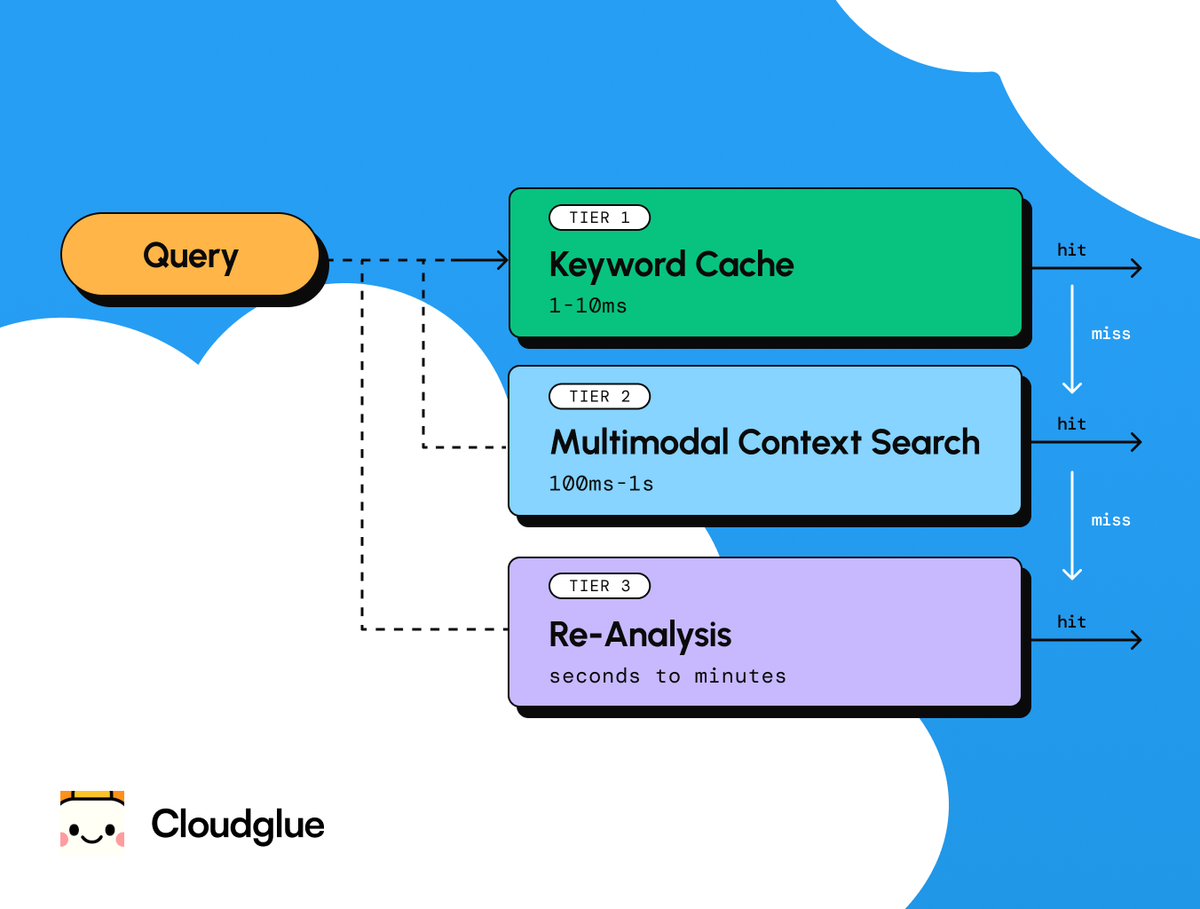
Notes on context engineering and agent harnesses for video libraries: designing the structured representations to make media legible to LLMs.
Since we started joining meetings from our computers, video has become the default way that organizations capture what happens at work. We’re at the point now where recording things has become so easy that we’ve created a new problem: we have more videos than we can ever watch.
Part of the reason LLMs were so transformative was because they gave us a way to synthesize text right when we were drowning in documents. Now we’re at that same point with video and audio, but the synthesis layer hasn’t arrived yet.
If you work with AI agents for coding, you may have noticed that the good ones are beginning to converge on the Unix design pattern. Read files → grep for patterns → edit in place → use the shell as your orchestrator. Each tool does one thing and does it well. Claude Code does this. LlamaIndex is building on it.
The pattern is powerful because text has a useful property: text is its own searchable representation. A Python file is simultaneously the program being run and the document being searched. A markdown file is simultaneously the content and the index.
This property has shaped much of the current thinking around agent design: context windows, tool use, and file-based memory assume that all the material an agent needs can be read and searched in its native form.
To be fair, this is true for a lot of the information we work with everyday, like code, logs, config files, and documents. But it’s not true for video, images, or similar non-textual data. An MP4 is a binary container of compressed frames and audio packets. There is no grep that finds a concept inside it.
So if filesystem idioms don’t translate to video, what replaces them?
The context window isn't the answer
Context windows are getting huge. Gemini now offers a 1M token context window that accepts video natively. It seems plausible that, with a big enough context window, you’d be able to work with video the same way you work with text.
But when you try, you bump up against some limitations pretty quickly. Gemini tokenizes video at roughly 300 tokens per second at high resolution, or about 100 at low resolution.
A 1M token window fits a small batch of short clips (Gemini caps requests at 10 videos) or a single meeting recording. That's useful for one-off tasks working with individual recordings. But it's not a general solution for working across a library.
Imagine your sales team did 120 calls last quarter, each about 35 minutes long. That's roughly 70 hours of footage, so somewhere around 25 million tokens at low-res tokenization. Twenty-five times more than fits in a single context window.
The query a sales leader actually wants to run looks something like:
“Across all 120 Q3 calls, find every moment where the prospect pushed back on pricing. For each, return the call ID, what the prospect said, the timestamp, who was on the call, and how the rep responded.”
You can't fit the data in to ask the question.
Suppose you could fit a whole video library, though. You’d still have two problems:
- You can't search inside a context window. You can only prompt over it, which is not quite the same thing. "Find every mention of pricing across these 20 recordings" is a retrieval problem. You want, targeted results over a known dataset. What you get instead is a best guess re-derived from frames on every run, with no guarantee the next run will agree with the last. That's not good enough when completeness matters.
- The economics are strange. If the answer to "who was the speaker at 14:32?" lives in a 30-second segment, the structured representation that captures the speaker's name and timestamp might be 100 tokens. Without that structured representation you'd send 50,000 tokens of video context to answer the same question (500× the cost).
Understanding the video is still a model call (a one-time index doesn't make it deterministic) but you pay that cost up front at extraction time instead of on every query that comes in afterward. The probabilistic cost and the token cost only get paid once and stay paid.
Context windows will keep growing. But unless the economics radically change, you’ll need to structure and index videos ahead of time to know where to look and avoid starting from scratch every time.
Every video is many videos
When we extract data from video today, we typically just pull the transcript, which does give us a lot to work with.
But when you introduce the possibility of querying all types of data within a video, a 30-minute recording turns out to be deceptively dense with information:
- Ask for a meeting summary and you get speaker timelines, discussion topics, action items, key decisions. Normal stuff.
- But ask for sales coaching from the exact same recording and you get something entirely different: talk-to-listen ratios, filler word frequency, how objections were handled, energy and pace through the call.
- Ask for customer sentiment and you’ll get new information again: an analysis of tone shifts when the conversation turned to pricing, facial expressions during the demo, and the beat of silence before an answer. The signs that actually tell you whether a deal is alive usually don't make it into the transcript.
Same video. Same binary blob on disk. Completely different knowledge, determined entirely by what you asked for.
Underneath any of these questions, the same baseline gets cached once per segment:
// Baseline — cached for every segment of every video
{
  "call_id": "q3-acme-2025-09-14",
  "start_time": "00:24:15",
  "end_time": "00:24:23",
  "transcript": "Yeah, that pricing makes sense for us.",
  "speakers": ["Jamie Park"],
  "visual_description": "Prospect on right, briefly looks down, glances back at camera. Slide titled 'Enterprise pricing' visible on left.",
  "on_screen_text": ["Enterprise pricing", "$2,400/mo"],
  "entities": ["Enterprise pricing"]
}
Prompt-specific extractions layer on top. Earlier in the same call, here's what a coaching query adds:
{
  "call_id": "q3-acme-2025-09-14",
  "start_time": "00:15:24",
  "end_time": "00:16:02",
  "objection": {
    "raised_by": "Jamie Park",
    "topic": "implementation timeline",
    "rep_response_summary": "Offered a 2-week pilot",
    "outcome": "addressed"
  }
}
And here's what a sentiment query adds for the segment we started with:
{
  "call_id": "q3-acme-2025-09-14",
  "start_time": "00:24:15",
  "end_time": "00:24:23",
  "prosody": {"energy": "low", "pace": "slow", "pitch_contour": "rising"},
  "facial": {"expression": "tight_smile", "eye_contact": "broken"},
  "sentiment": {"direction": "negative", "confidence": 0.78}
}
The transcript said the prospect agreed. The prosody and facial data disagree. No single modality catches this on its own; aligned on a shared timeline, they do. The original sales-leader query becomes a trivial filter over the coaching schema, joined to the sentiment schema. No need to rewatch or re-prompt the raw video.
In video, there's the speech transcript, obviously, but also speaker identity, visual scene descriptions like on-screen text, slides and product walkthroughs, entity references, chapter boundaries, laughter, cross-talk, camera shot boundaries, tone shifts, and more.
Each of these is a different representation of the same source material. None of them is "the" representation. All of them are lossy. And all of them are useful, for different tasks and at different times.
The job then becomes deciding which projections to compute, how to align them temporally, and how to make the results composable and searchable.
This is context engineering for video libraries: designing structured intermediate representations that make opaque media legible to an LLM.
We studied this question in our research on aligned video captions: time-aligned compact representations that combine signals across modalities (speech, visual, textual) consistently outperform both single-modality approaches and context window stuffing, across 1.8 million clips.
The representation layer is what gives an agent something like grep-level access to video. It does this by creating the searchable object that the original format never was.
Making grep work for video
To create a grep-like pattern for video, you need to run the process in reverse.
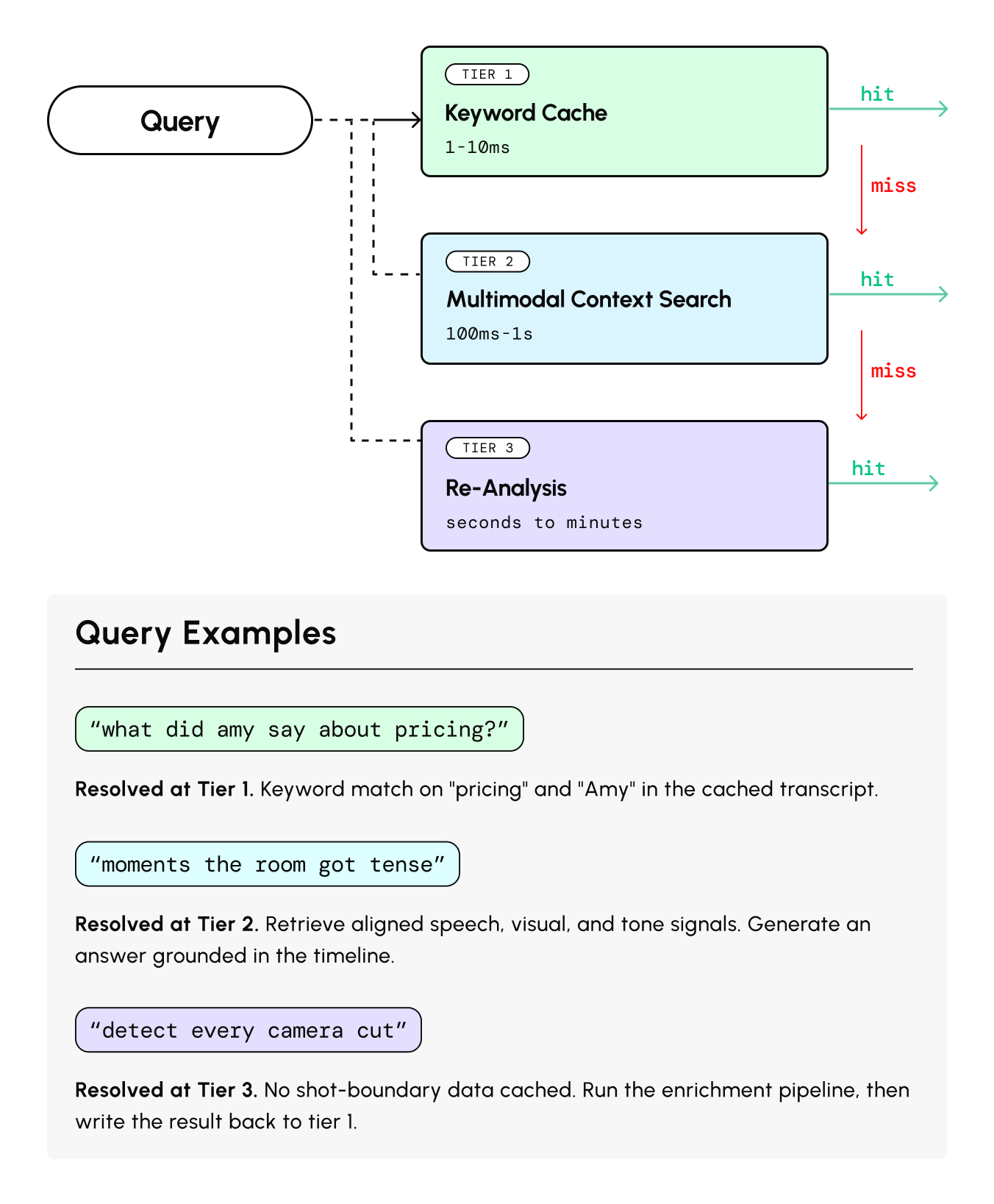
For text, you search first and read second. grep finds the line and cat shows the file. For video, the searchable form doesn't exist yet. So you go the other direction: describe first, cache the result, then search.
This means a video agent needs three tiers of lookup:
- Local keyword search over cached enrichments. Instant and free. This is the equivalent of grep over a file you've already written. Against the Q3 collection, a query like objections.topic = "pricing" returns every relevant moment across all 120 calls, with citations.
- Semantic search across an indexed collection. A question like "find moments where the prospect hesitated before answering" can't be answered by keyword matching. It needs embeddings that map a text query to the relevant spans of time across your enriched representations, matching on meaning rather than words.
- Full re-analysis: Send the video back through the enrichment pipeline. Expensive, and a last resort for when existing cached representations don't contain what you need.
The enrichment cache is the key primitive. It needs prompt-aware keys. The same video processed with different extraction schemas produces different cache entries that coexist.
And it needs multiple output fidelities: a compact representation (~1–4KB per video) for routing and quick lookups, and a full structured output (50K+ tokens) for deep analysis.
This architecture also gets cheaper over time. Each interaction enriches the cache, which makes the next query faster and less expensive.
It solves the inefficiency problem of the context window approach, where every question starts from scratch, with the full cost of the raw media.
The other 90% of our information
Translating every type of information encoded in a video into structured data LLMs can understand opens up a class of work transcripts can’t support.
Pulling the transcripts from a sales call helps an account executive review the topics and action items they covered with a prospect. But with video context engineering, a sales leader working with the same Q3 collection could analyze a quarter’s worth of calls and generate a coaching plan for their team. They could query for and extract talk-to-listen ratios, filler-word frequency, objections and their responses, energy levels, pricing negotiations, and phrases that progressed deals.
This is just one example. As with LLMs, I think we’ll discover hundreds more as we get accustomed to doing work across huge libraries of video. We’re building in this space at Cloudglue now. I’ll share more soon on what video context engineering makes possible.